A little space. A lot of possibility.

Less clutter.
More room for life.

Photo and file cleanup for Mac, iPhone and iPad.
See your photos and files clearly. Keep the good stuff.

Made for iPhone, iPad & Mac

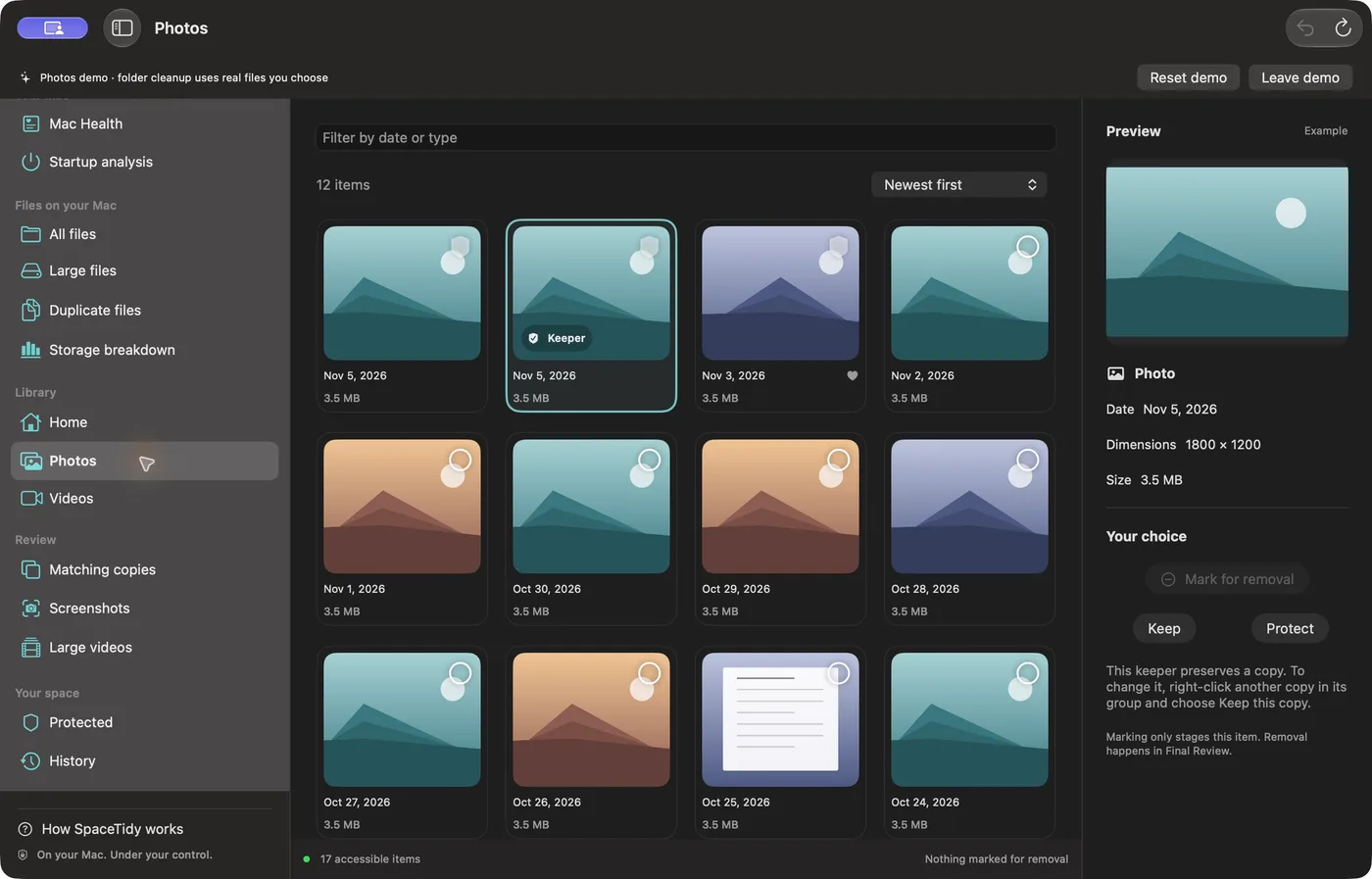
Actual SpaceTidy Mac Photos screen with demo-library thumbnails, protected keepers and file-review navigation.
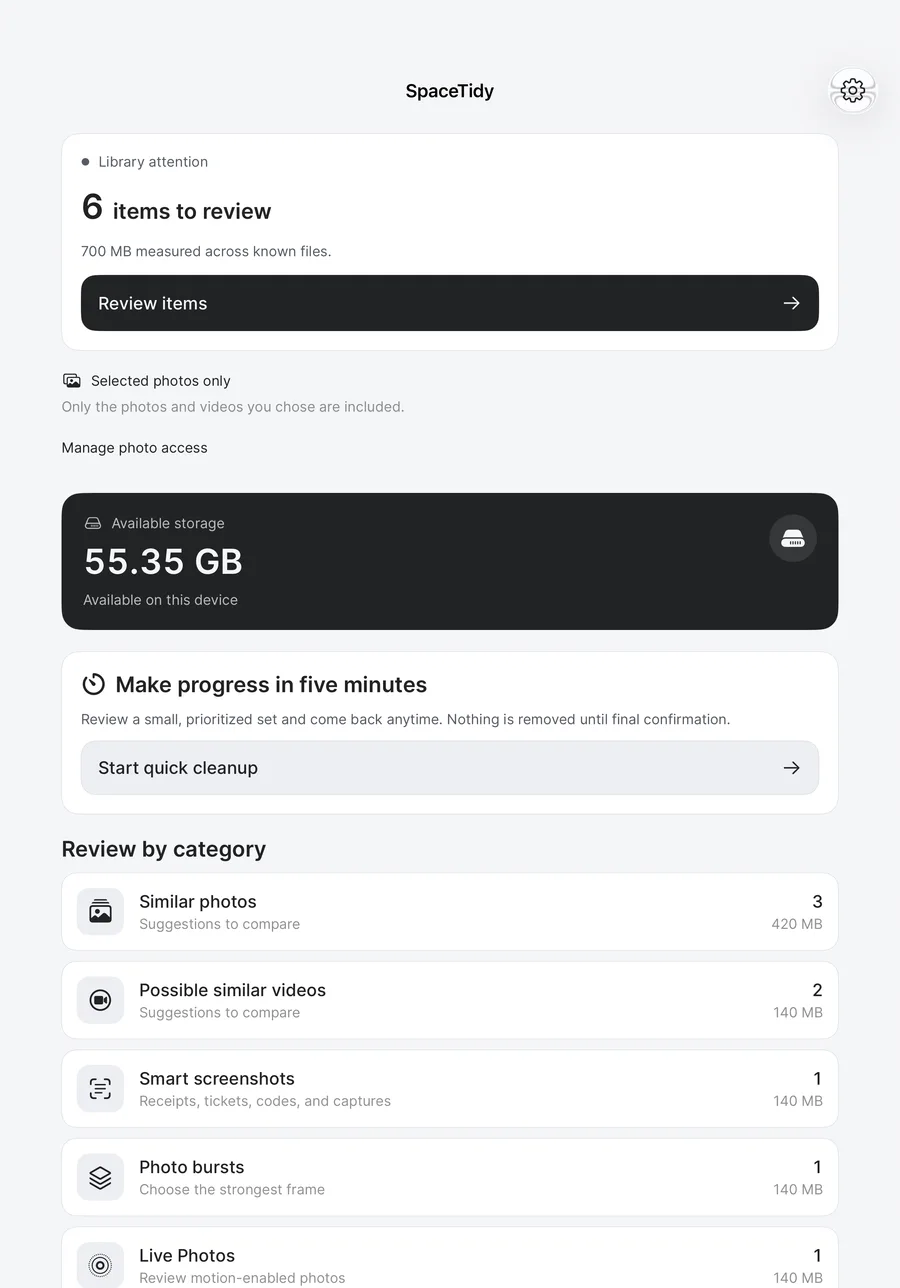
Actual SpaceTidy iPad home screen showing library review, available storage and cleanup categories with test data.
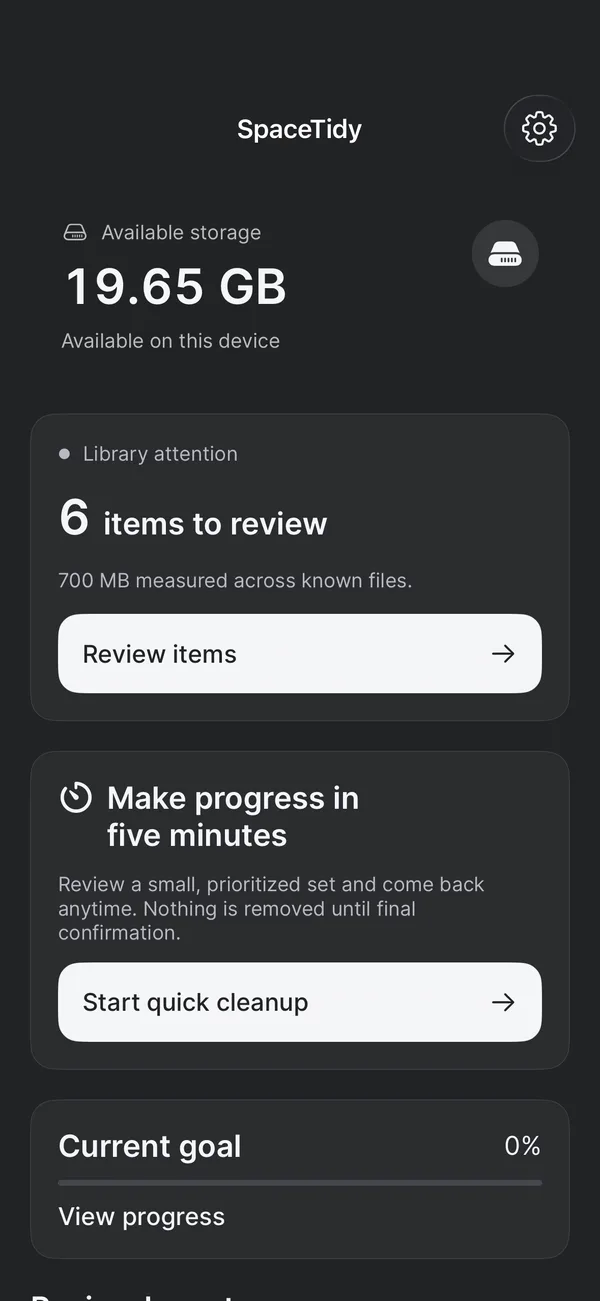
Actual SpaceTidy iPhone dashboard showing available storage and a five-minute review session with test-library data.

Actual SpaceTidy screens with demo and test-library data. Device frames are illustrative.

On-device analysisNo account neededReview before removaliPhone, iPad & Mac
SPACETIDY FOR MAC

A bigger picture.
A little more space.

From camera roll to Downloads folder.
See what’s taking up room,
then choose your next move.

SpaceTidy · Space mapSample data
YOUR CHOSEN FOLDERS

Your storage, in proportion.

24 GBmeasured files

Choose folders. Explore the map. Review individual files.

Illustrative Mac layout and sizes. Maps cover scanned, accessible files in folders you choose.

SPACETIDY FOR IPAD

A little more room
to see the details.

Review your library on a larger display. Explore chosen folders with storage charts, a space map and file previews—all with the same careful approach as iPhone.

IPHONE

Progress in your pocket.

Review photos and videos, compress a copy, organize contacts and keep private files in your vault. Files & space adds chosen-folder scanning, duplicate comparisons and storage maps.

Preview selected files here; manage file removals in Files.

IPAD

A wider view of what stays.

The iPhone toolset, arranged for iPad with sidebar navigation and more room for your library, file previews, largest-file lists and visual storage maps.

iPadOS 17 or later · access only to the libraries and folders you choose.
MAC

Clarity across your workspace.

Explore your Photos library and chosen folders. Review duplicate files, storage maps, Mac Health charts, startup information and a folder-based disk speed test. Photo and video compression, an encrypted vault and contact review are included too.

Reviewed file moves go to Trash, with cleanup history for supported restores.

A shared approach. Tools for each device.

Current app capabilities by platform
FeatureiPhoneiPadMac
Photo & video review
Chosen-folder scans & space maps
Large-file & duplicate-file review
Photo & video compression
Private vault & contact tools
CPU, memory & startup views——
Folder-based disk speed test——
File removalIn FilesIn FilesReviewed move to Trash

One thoughtful approach. Features and access vary by platform. No automatic cleanup or system-wide access.

PHOTOS, VIDEOS & CHOSEN FOLDERS

Keep what matters.
See what’s extra.

Photo libraries on Mac, iPhone and iPad. Files in folders you choose.
Compare the copies, explore the big items, and take a closer look.

A little hands-on cleanupInteractive demo · Sample data

Nothing starts selected.
You’re always in control.

Same memory. Fewer copies.

Compare the extras and choose what goes. Your keeper stays protected.

0Choose a few extras to review

Try selecting an item, then review it. This demo never accesses your photos or files.

A LITTLE CLEANUP. A LOT OF CONTROL.

Three steps.
Your call, every time.

Make progress in a few spare minutes.
Pick up where you left off.
Change your mind along the way.

01

Find your starting point.

Choose a Photos category on any device, or connect a folder to inspect its files and storage map.

02

Compare before you decide.

Inspect photo candidates, preview large files, and compare matching copies. Nothing starts selected for removal.

03

One final look.

Confirm photo removals with Apple. Review Mac file moves before they go to Trash. On iPhone and iPad, manage file removals in Files.

Photos use Recently Deleted. Mac file cleanup uses Trash. iPhone and iPad folder scans leave files unchanged. Storage updates can take time.

MAC TOOLS, MADE VISUAL

Know your workspace.
Choose what changes.

Storage, activity and startup information in one place.
Measured views, with review before cleanup.

Storage with perspective.

Explore folder categories and the space map. Compare large files and duplicates in the folders you connect.

Sample proportions · chosen folders only

See Mac activity.

Check CPU activity, memory diagnostics and available storage. Readings provide context for your Mac’s workload.

Illustrative chart · no automatic performance fixes

Review your next step.

Chosen foldersCleanup history

Inspect startup information and selected cleanup candidates. Supported file moves are recorded for later restore.

No automatic removal or emptying Trash
PERSONAL TOOLS · MAC, IPHONE & IPAD

A few thoughtful tools.
A lighter everyday.

Photo and video compression, an encrypted vault and contact review.
For the files you want to keep, the details you want to tidy,
and the moments that deserve a little privacy.

Big moments.
Smaller copies.

Make a smaller photo or video copy without touching the original. Preview it, compare the size, and decide what stays.

Your original stays until you remove it.
Clear blue sea beside a rocky Italian coastlineA day worth keeping
Original480 MB
Smaller copy146 MB

Illustrative sizes. Results depend on your video.

PRIVATE VAULT

A little personal space.

Encrypted on your device. Opened with device authentication. Import a copy of a file and keep the original where it is.

CONTACTS CLEANUP

Less “which Jamie?”

Review duplicate contacts, save a backup, and merge the details you choose. A tidier address book starts here.

Saved review progressProtected favoritesShortcuts & widgetsOn-device photo insights
YOUR PHOTOS. YOUR FILES. YOUR CHOICE.

Personal on every device.
Under your control.

Photo and file analysis happens on your Mac, iPhone or iPad.
No SpaceTidy account. No photo or scanned-file uploads to us.
Your cloud providers still follow your own settings.

SMALL APP. THOUGHTFUL APPROACH.

Good things need
room to grow.

We’re putting the finishing touches on SpaceTidy.
Clear pricing is part of the plan.

A clear price before you subscribe.No made-up storage warnings.You choose what gets removed.
Made for Apple devices

SpaceTidy

A little more room.For iPhone, iPad & Mac

  • Photo & video review
  • Mac health, storage & startup views
  • Compression, vault & contacts across all three platforms
  • Visual folder tools, tailored to each platform
  • Saved progress & protected keepers

Launch pricing is being finalized. Public downloads and paid plans aren’t available yet.

Try the interactive demoA preview of what’s coming. No purchase required.
A FEW GOOD QUESTIONS

A little clarity.

Before you make a little room.

Does SpaceTidy delete photos automatically?

No. Remove stages a choice during review. You then check the selection in Final Review and approve Apple’s deletion prompt. Until that confirmation, your library stays as it is. Favorites and protected items are kept out of removal selections.

Will I lose my original when I compress a video?

On Mac, iPhone and iPad, compression saves a separate smaller copy. SpaceTidy checks the result and preserves the original. Removing that original is a separate, explicit decision.

Do my photos and files leave my device?

SpaceTidy performs library analysis on your device and does not upload your photos or scanned files to us. Apple’s iCloud Photos can continue syncing according to your own settings. Exporting or sharing a file is always a separate action you choose.

Why might a removed photo still appear in Recently Deleted?

That’s part of how Apple Photos works. Removed items stay in Recently Deleted for a recovery period. They can still take up space there, and iCloud syncing can delay storage updates. SpaceTidy does not empty Recently Deleted for you.

Can it clean system storage or other apps?

On iPhone and iPad, SpaceTidy cannot clear system data or other apps’ caches. Its folder tools cover files you explicitly select. On Mac, folder access and cleanup are also permission-based; nothing clears all system storage, empties Trash or changes your hardware settings automatically.

Do Mac, iPhone and iPad have the same features?

They share photo and file-review ideas, with interfaces made for each device. Mac adds desktop storage, health and startup tools. Mac, iPhone and iPad include compression, contact tools and a private vault. iOS folder tools include visual maps and file previews. Availability differs by platform; this is not a promise of identical features or synced review history.

When can I download it, and what will it cost?

Public App Store availability and launch pricing will be announced here. This website’s interactive demo uses sample files and is free to explore.

Which devices will it support?

The iPhone and iPad apps require iOS or iPadOS 17 or later. The native Mac app requires macOS 14 or later. Features depend on your platform and the permissions you grant. Folder tools analyze selected accessible files, not your entire device.

Make room for what
comes next.

Take a little look

For the photos, files and projects worth keeping—on Mac, iPhone and iPad.